In today’s fast-paced healthcare environment, increasing the available space in medical facilities is essential. Whether it’s a busy hospital, a clinic, or a medical research center, efficient use of space can improve both patient care and staff productivity. One key solution that has gained significant attention in recent years is the use of floor stand medical monitor arms. These versatile devices allow medical professionals to easily adjust the positioning of their monitors, creating more accessible and ergonomic workspaces. When paired with various mounting options such as heavy-duty triple monitor mounts, dual monitor bracket wall mounts, and floor mount monitor arms, they contribute to space-saving strategies while maintaining a high level of functionality.
Heavy Duty Triple Monitor Mount: The Ideal Solution for Multitasking
For medical environments that require constant access to multiple displays simultaneously, a heavy-duty triple monitor mount is a reliable choice. These mounts are specifically designed to support three monitors, which can be invaluable in situations where healthcare professionals need to view patient data, medical images, and diagnostic results at the same time. In a radiology department, for example, a heavy-duty triple monitor mount allows the radiologist to view multiple X-ray images and reports concurrently, ensuring a streamlined workflow and reduced time spent switching between different sources of information.
These heavy-duty mounts are designed to handle the weight of three monitors without compromising stability or durability. In a medical setting, where equipment reliability is essential, investing in a high-quality triple monitor mount ensures that the monitors remain securely in place, even during frequent adjustments. Additionally, many heavy-duty mounts come with built-in cable management systems to keep the workspace organized and free from clutter, further contributing to a clean and professional environment.
Dual Monitor Bracket Wall Mount: A Space-Saving Wall-Mounted Option
In many medical offices, space is at a premium, and having a dual monitor bracket wall mount can be a game-changer. These mounts allow healthcare professionals to install two monitors on a single bracket, securely fastening them to the wall. The primary advantage of this solution is the ability to free up valuable desk or counter space, which can be used for other medical equipment or materials.
A dual monitor wall mount provides a stable and sturdy option for professionals who need to view multiple displays but do not have the floor space to accommodate additional stands or arms. This is especially beneficial in areas like examination rooms or small clinics where the floor space is limited. By mounting the monitors on the wall, the workspace becomes significantly more organized, and healthcare professionals can work in a more ergonomic manner, reducing neck strain from constantly looking down at traditional desk-mounted displays.
Moreover, dual monitor bracket wall mounts offer flexibility in terms of adjusting the height, tilt, and rotation of the screens, allowing medical staff to personalize their workspace according to their preferences. This adjustment capability is particularly useful in medical settings where different individuals may need to use the same space at different times.
Floor Mount Monitor Arm: A Flexible, Adjustable Solution
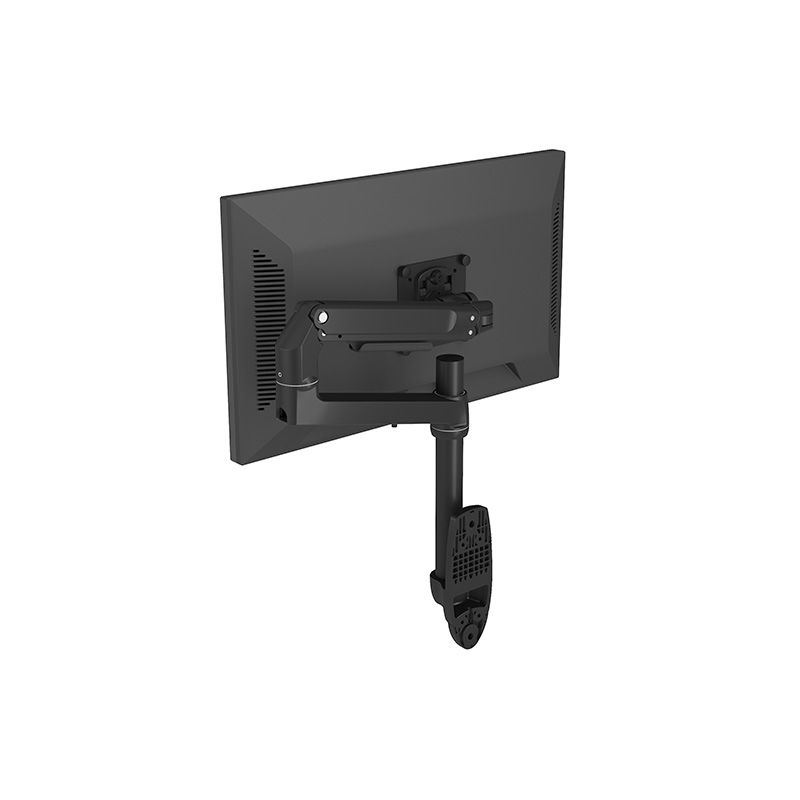
Another highly effective space-saving solution is the floor mount monitor arm. Unlike traditional monitor stands that occupy valuable desk space, a floor mount arm provides a freestanding option that can hold one or more monitors without taking up space on the workstation surface. This type of mount is particularly useful in environments where desk space needs to be preserved for other tasks, such as taking patient notes, using medical instruments, or preparing medications.
Floor mount monitor arms are designed to be adjustable, allowing medical professionals to move the monitors into various positions for good viewing angles. Whether it’s adjusting the height for standing or sitting positions, or repositioning the monitor to avoid glare from surrounding lights, the flexibility offered by floor mount monitor arms can help create a more comfortable and productive workspace. Additionally, many floor mount options come with integrated cable management, reducing the risk of tangled cords and ensuring a clean and organized setup.
In some cases, floor mount monitor arms can be used in combination with other mounting solutions, such as the heavy-duty triple monitor mount or the dual monitor bracket wall mount. This allows for an adaptable workspace where the monitors can be placed exactly where they are needed, regardless of the size or layout of the room.
Combining Solutions for up to Efficiency
While each of these mounting options has its unique benefits, combining them can provide a comprehensive space-saving solution for medical facilities. For example, a floor mount monitor arm can be used for a single monitor, while a dual monitor bracket wall mount can hold additional screens in areas with limited desk space. In cases where three or more monitors are required, the heavy-duty triple monitor mount is an ideal choice for creating an efficient, space-conscious setup.
By incorporating these space-saving solutions into their workflow, healthcare professionals can ensure that they have the tools they need to provide high-quality patient care, while also maintaining an organized and efficient workspace. Furthermore, with the growing importance of digital health and telemedicine, the need for adjustable and flexible display solutions will continue to rise, making monitor arms and mounts an essential part of any modern medical facility.
Space-saving solutions, such as floor stand medical monitor arms, heavy-duty triple monitor mounts, and dual monitor bracket wall mounts, are indispensable in modern healthcare environments. They offer the flexibility, stability, and ergonomic benefits needed to create a functional and organized workspace, ultimately enhancing both the efficiency of medical staff and the quality of patient care. As medical technology continues to evolve, these mounting solutions will play an increasingly vital role in shaping the future of healthcare facilities.
We will reply to you within 12 hours after receiving the inquiry on working days. Or, give us a call.


Copyright © Yongkang Zhida Industry and Trade Co., Ltd. All Rights Reserved

China Stand Arm Monitor Factory


 English
 日本語
日本語 Español
 Deutsch
 عربى
عربى Nederlands
 Français
