In many modern work setups, people spend long stretches in front of screens handling emails, projects, or personal tasks at home. Switching to a Wall Mount Monitor Arm can quietly ease that crowded feeling and bring a bit more comfort to the daily routine. The arm lifts the monitor clear of the desk, opening up room for notes, devices, or whatever else shows up during the day. Gone is the bulky base that eats into surface area and keeps everything stuck in the same spot.
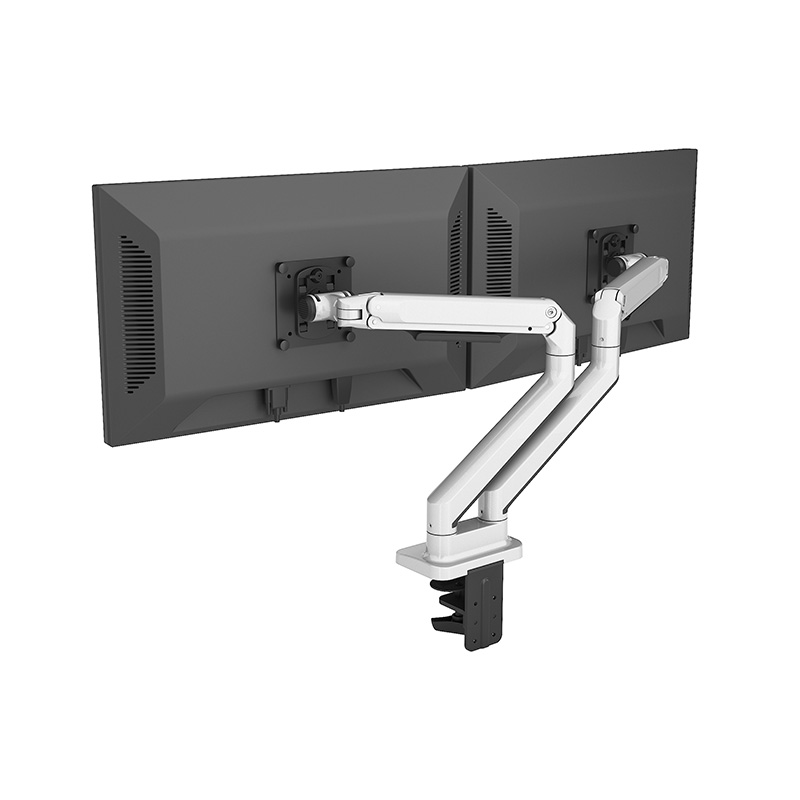
Moving the monitor to the wall frees up space on the desk almost instantly. That cleared area makes it easier to spread out papers, keep a tablet close, or simply avoid shuffling items around all the time. The difference shows up clearly in tighter spots, whether a small apartment desk or a shared corner in the living room.
Many Wall Mount Monitor Arm models come with cable channels or simple clips that guide wires along the arm and out of sight. It's a small touch that keeps the desk from turning into a jumble of cords after regular use. When two or three screens are involved, the arms spread them across the space while leaving the middle of the desk open for actual work.
In everyday setups this usually means:
The change starts small, but after a week or so the reduced clutter makes it easier to stay focused without constant distractions.
Sitting too long with a screen fixed in place often leads to that familiar tightness in the neck and shoulders from leaning in. A Wall Mount Monitor Arm lets the screen shift up or down, closer or farther, until it sits more naturally for normal viewing.
The screen can tilt slightly to soften reflections from nearby windows or lights, move forward for detailed work, or slide back during extended meetings. Side movement comes in handy too when someone nearby needs a quick look at the display.
A few adjustments that tend to help include:
With regular use, these little shifts help ease the stiffness that builds when the setup never changes.
Innovative Monitor Arm designs avoid locking things into a single routine. At home they fit solid setups into spots that once felt too cramped. In a workshop or studio the monitor can swing aside during hands-on work and swing back when measurements or references are needed.
Gaming setups gain from precise angle tweaks during longer sessions without the usual hunching. Shared spaces or quick team discussions benefit when the screen turns easily for group viewing without moving furniture around.
The arms fit naturally into situations such as:
Rather than letting the space dictate movement, the arms simply offer choices as the day unfolds.
Taking the monitor off its chunky base clears visual clutter from the desk right away. The surface looks calmer, and the slim arm fades into the background instead of pulling focus. The whole room gains a slightly more organized feel without any big redesign.
Screens can angle to line up smoothly with shelves or nearby furniture, creating a cleaner flow across the area. In home offices that guests might see or in professional corners, the setup steers clear of that overloaded tech look and keeps a more intentional appearance.
Details that often catch the eye after setup include:
The improvement registers quietly when others walk in, even if they can't quite say what changed.
A Wall Mount Monitor Arm or Innovative Monitor Arm gathers several practical improvements that build over time. The setup adds usable desk space, simpler screen positioning for comfort, and flexibility to match shifting tasks or users. Work areas also appear tidier, making it easier to settle in and begin.
The arm transforms a standard desk into one that adjusts with changing needs instead of requiring constant adaptation. Whether handling solo projects, brief collaborations, or transitions between sitting and standing, quick repositioning fits into a smoother daily pattern. Many who switch from traditional stands later find the fixed approach more limiting.
When an existing arrangement begins to feel rigid or crowded, a wall-mounted arm provides a direct way to add room and adjustability without a full redesign. The benefits appear gradually through small, consistent improvements each time the workspace comes into use.
We will reply to you within 12 hours after receiving the inquiry on working days. Or, give us a call.


Copyright © Yongkang Zhida Industry and Trade Co., Ltd. All Rights Reserved

China Stand Arm Monitor Factory


 English
 Español
 Deutsch
 عربى
 Nederlands
 Français
 日本語

