Yongkang Zhida Industry and Trade Co., Ltd.
Display configurations are changing as companies adopt larger screens, dual-monitor workstations, and more specialized digital workflows. A workstation that starts with one display may later require a second screen or a different monitor format, making mounting flexibility an important purchasing consideration. For office furniture brands, distributors, and equipment buyers, choosing a Monitor Arm should therefore involve more than checking whether it fits today's screen. The mounting solution should also leave room for practical upgrades without creating unnecessary installation or stability problems.
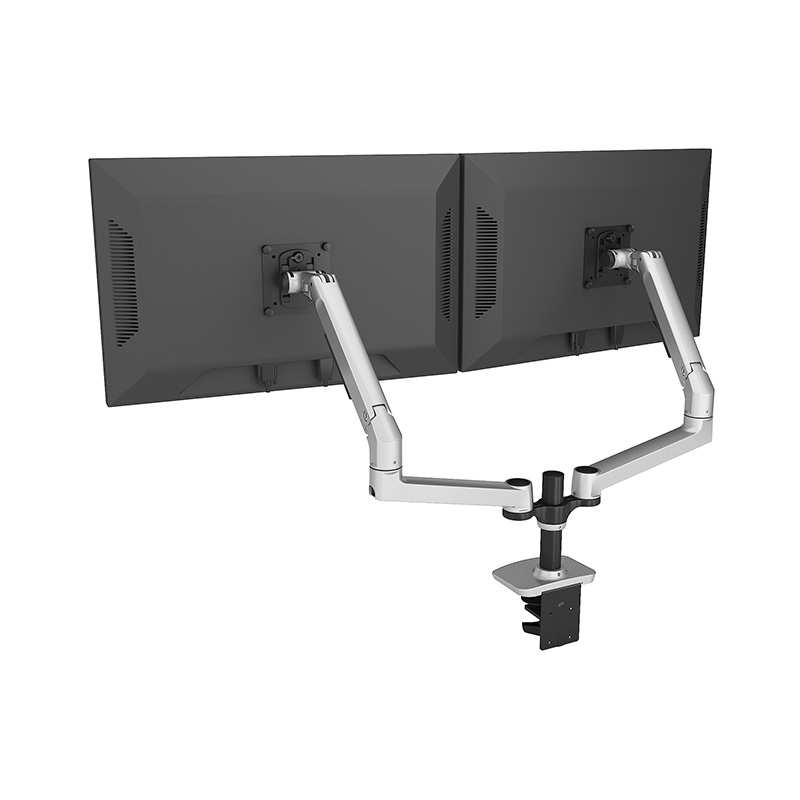
Adding a second monitor sounds straightforward until both screens need to share the same working area. Their sizes, positions, viewing angles, and mounting points can all affect how the arms move and interact.
A poorly planned setup may leave screens misaligned or consume more desk space than expected. A properly designed mounting system, however, can help organize multiple displays while allowing each screen to be positioned according to its role. This is particularly useful for users who compare documents, monitor dashboards, develop software, or work across several applications.
When buyers compare monitor mounting solutions, screen size often becomes the consideration. It should not be the only one. Different displays can have different weights, mounting interfaces, center-of-gravity positions, and housing shapes.
For procurement teams, compatibility should be reviewed across the complete configuration:
Looking at these factors together reduces the risk of selecting an arm that works with one display but becomes difficult to use after a later upgrade.
Larger and ultrawide monitors have also influenced workstation design. Their wider profile can require a different approach to positioning, particularly when users need to move the screen closer, adjust its angle, or combine it with another display.
For an arm manufacturer, this means structural design cannot focus only on vertical support. Joint movement, connection points, arm geometry, and mounting stability need to work together. The goal is to make adjustment practical without allowing the screen to drift away from its intended position during normal use.
A dual monitor arm should not simply hold two screens side by side. Each display may serve a different purpose, so independent adjustment can be important.
One screen might be used as the primary working display while the second supports reference material or monitoring tasks. If both screens are permanently tied to the same movement, users may have to compromise between their preferred positions.
Independent arm movement provides greater control over height, angle, distance, and orientation. For commercial workstations, this flexibility can also make the same mounting platform suitable for different user preferences and screen combinations.
For distributors and OEM customers, product flexibility can influence purchasing decisions beyond the initial order. Office layouts change, monitor models are replaced, and workstation configurations may evolve.
A scalable monitor mounting platform can therefore be valuable when it supports different configurations without requiring an entirely new mounting concept. Modular components, interchangeable mounting parts, and practical installation methods can make future product variations easier to manage.
As a Monitor Arm manufacturer, we approach product development from both the structural and assembly perspective. A smooth-looking design still needs consistent components, reliable joints, accurate mounting interfaces, and controlled assembly processes to perform properly.
During manufacturing, attention to component consistency and functional inspection helps reduce variation between production batches. For OEM buyers, this matters when products are supplied across multiple projects, because predictable assembly and adjustment can simplify installation and after-sales support.
The mounting decision is rarely based on a single monitor specification. Buyers should consider today's display arrangement while also thinking about possible upgrades, dual-screen applications, larger formats, and changing workstation requirements.
For overseas distributors, office furniture manufacturers, and OEM customers, discussing the intended application with an experienced supplier can help identify a suitable structure before mass production begins. A thoughtfully engineered Monitor Arm can support today's workstation while providing a practical foundation for tomorrow's display configuration.
We will reply to you within 12 hours after receiving the inquiry on working days. Or, give us a call.


Copyright © Yongkang Zhida Industry and Trade Co., Ltd. All Rights Reserved

China Stand Arm Monitor Factory


 English
 Español
 Deutsch
 عربى
 Nederlands
 Français
 日本語

